
In BGP Anycast we advertise the same prefix/AS from different geographical locations For example if we advertise 192.168.33.0/24 from China, France and Canada.
When contacting 192.168.33.100 a user in China will be routed to the data center in China and the user in France will be routed to the data center in France and the user in China will be routed to data center in Canada.
It is also important to have a mechanism that if the server in one of the data centers go down the BGP advertisement also stops so the traffic is routed to the functional servers in other locations.
If we make sure that the same service is available under the IP 199.x.x.x in all three locations then the users will not notice the difference and will experience a better performance in terms of latency and delay.
One of the main applications o BGP Anycast is in global DNS root servers, but it also can be scaled smaller scopes.
Here is a typical configuration:
1- Install a CentOS server with DNS and BGP on it.
2- Assign the IP 192.168.33.100/32 to the loopback interface of the server.
3- Create a BGP session with edge routers.
4- Advertise the 192.168.33.0/24 through BGP (Actually we only need to advertise 192.168.33.100/32 but since service providers don’t accept prefix length greater than 24 we have to advertise 192.168.33.0/24)
5- A static blackhole route is necessary for 192.168.33.0/24 in order for the BGP to work.
6- We need to redistribute the route 192.168.33.0/24 from BGP to OSPF in order for the route also to be propagated to Core switches through OSPF session between routers and core switches.
( The dashed lines in the picture are logical connections rather than physical)
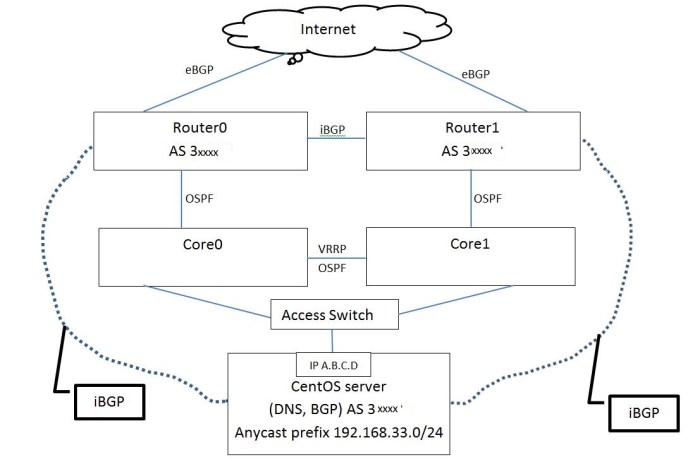
NOTICE: The following configurations have not been tested and are to be used as guidelines
1- CentOS server configuration:
This configuration is only for BGP and it doesn’t include DNS configuration. The loopback address in this example is 192.168.33.33/32 and the prefix advertised by BGP is 192.168.33.0/24 from the private AS 64515
We also don’t need to receive any routes from BGP so we filter it using a deny-all route-map
For converting the CentOS to a router see the this KB:
How to convert CentOS to a router
Loopback interface ( Assuming that we want to set the loopback address at 192.168.33.33/32)
# cd /etc/sysconfig/network-scripts
# cp ifcfg-lo ifcfg-lo:1
# vi ifcfg-lo:1
Change the following
IPADDR=192.168.33.33
NETMASK=255.255.255.255
# service network restart
BGP configuration
# vtysh
# conf t
# router bgp 3xxxx
# bgp router-id x.x.x.x
# no synchronization
# no auto-summary
# network 192.168.33.0/24
# neighbor “IP-Router0” remote-as 3xxxx
# neighbor “IP-Router0” route-map DENY in
# neighbor “IP-Router1” remote-as 3xxxx
# neighbor “IP-Router1” route-map DENY in
# ip route 192.168.33.0/24 Null0
# route-map DENY deny 10
Add a script that monitors the DNS service and if it stops then BGP service is also stopped.
Something like this:
#!/bin/bash
DNSUP=`/usr/sbin/dig @192.168.0.1 localhost. A +short`
if [ “$DNSUP” != “127.0.0.1” ];
then
echo “Stopping Anycast….”
/etc/init.d/bgpd stop
/etc/init.d/zebra stop
/etc/init.d/named stop
else
echo “Everything’s good… Do nothing…”
fi
2- Routers 0,1 configuration:
Assuming that the IP address of the physical interface of CentOS server is A.B.C.D
The route-map DENY-ALL makes sure that we don’t advertise any routes to CentOS server.
The route-map BGP-to-OSPF makes sure that only route 192.168.33.0/24 is redistributed from BGP to OSPF.
protocols {
bgp 3xxxx { …………………
neighbor A.B.C.D {
remote-as 3xxxx
route-map {
export DENY-ALL
}
}
} ………….
ospf {
area 0.0.0.0 {
}
redistribute {
bgp {
route-map BGP-to-OSPF
}
}
}
policy {
……..
prefix-list BGP-to-OSPF {
rule 10 {
action permit
prefix 192.168.33.0/24
}
………
route-map BGP-to-OSPF {
rule 10 {
action permit
match {
ip {
address {
prefix-list BGP-to-OSPF
}
}
}
}
}
…………..
}
Similar changes must be made in Router1. We also need to contact both ISPs to allow the prefix 192.168.33.0/24 in their filters.
References:
http://ddiguru.com/blog/118-introduction-to-anycast-dns
http://ddiguru.com/blog/125-anycast-dns-part-5-using-bgp
 Peter's Tech Blog