
- First we create a virtual hub with the name of “DRAC” in SoftEther and select and select “No enumerate to anonymous users”

- In the management of virtual hub, click on “Manage Users”
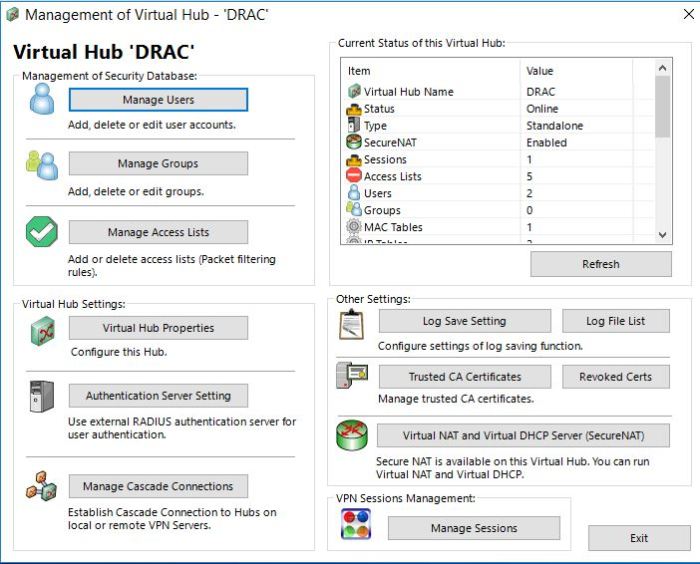
- Click on “New user” and fill in the username and password.

- Back to the window shown in step 2 click on “Virtual NAT and Virtual DHCP server (SecureNAT)”
Then “Enable SecureNAT” and click on “SecureNAT configuration”
Remove the “Default Gateway Address” and “DNS Server Address”
We make sure to filter the MAC address of the new virtual hub in the DHCP filter in RIS.
- Click on “Edit the static routing table to push” in the previous window
Add the route 10.10.0.0/16 to be routed through gateway address 192.168.30.1
This static route will be installed on client’s computer
- Back to the window shown in step 2, click on “Manage Access Lists”
There is a rule for each user to limit their access only to the IP address of their server’s Drac and they can’t access other Drac IP addresses.
So the rule with priority 1000 (shown below) limits the access of user Jdoe to IP address 10.10.x.x/32
The rules 1200 and 1300 are for DHCP to work properly.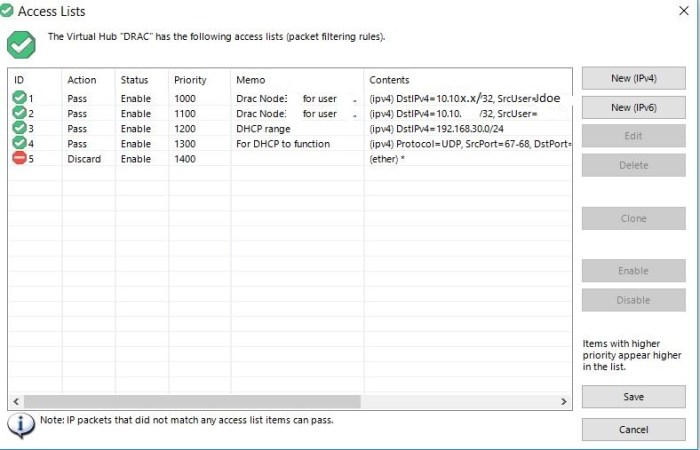
- After creating the user account in Drac we open a ticket with client as following
In order to access KVMoIP please follow these instructions.
I- Since KVMoIP is on a private network, you need to first connect to our VPN server and then connect to KVMoIP using a browser.
Use this KB and the following information to connect to our VPN server:
[ Link Redacted ]
—————————————————————-
VPN server hostname: vpn.example.com
Username: Jdoe@DRAC
Password: 123456—————————————————————
II- After successfully connecting to VPN server, use the following URL and credentials to connect to DRAC (KVM)
——————————————-
https://10.x.x.x
Username: Jdoe
Password: 123456——————————————-
 Peter's Tech Blog