
We have two nodes, on one we run iperf as a server, and on the other we’ll run iperf as a client with some arguments to connect to the server and run the tests.
iperf3 is available for Windows with GUI and it can be installed on CentOS using “yum install iperf3” (assuming epel repository is installed).
However my attempts to use iperf3 between Linux and Windows were unsuccessful and here we focus on iperf2.
Also make sure that the ports are not blocked by firewall in any of the nodes. The flow of packets is from client to server. So there is the chance that the iperf server’s firewall block the incoming packets.
Installing iperf2 on CentOS 6
1- Install the EPEL repository:
# curl -O http://dl.fedoraproject.org/pub/epel/6/x86_64/epel-release-6-8.noarch.rpm
# chmod 755 epel-release-6-8.noarch.rpm
# rpm -ivh epel-release-6-8.noarch.rpm
If after installing EPEL repository you get this error after running yum :
Error: Cannot retrieve metalink for repository: epel. Please verify its path and try again
Run this command to fix it:
# yum upgrade ca-certificates –disablerepo=epel
2- Install iperf2 on CentOS 6.
# yum install iperf
Installing iperf2 on Windows
Download it from : Download it from https://iperf.fr/iperf-download.php At the time of writing this KB the iperf 2.0.5-3 is the latest version of iperf2 for Windows.
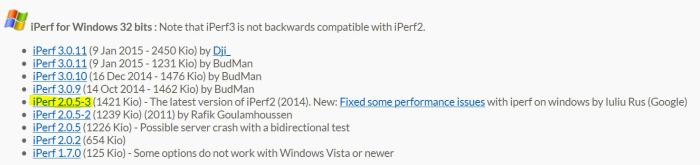
It doesn’t need installation and it can be run in command prompt. Either add the path to Windows or change directory
C:\Users\Administrator\Desktop\iperf-2.0.5-3-win32\iperf-2.0.5-3-win32>iperf -s -p 5003
Commands to run iperf in server or client mode
The syntax for both Windows and Linux is the same and it must be run as client in one host and as server in the other.
The following command makes the node as server listening on TCP port 5003
# iperf -s -p 5003
The following command sets the node as client sending TCP packets to server with IP 192.168.155.14 in a period of 90 sec and shows the stat every 10 sec.
# iperf -c 192.168.155.14 -p 5003 -f m -i 10 -t 90
———————————————————————————————-
Example 1 – Linux in client mode and Windows in server mode:
[root@node439 ~]# iperf -c 192.168.200.81 -p 5003 -f m -i 10 -t 90
————————————————————
Client connecting to 192.168.200.81, TCP port 5003
TCP window size: 0.06 MByte (default)
————————————————————
[ 3] local 192.168.200.244 port 40583 connected with 192.168.200.81 port 5003
[ ID] Interval Transfer Bandwidth
[ 3] 0.0-10.0 sec 754 MBytes 632 Mbits/sec
[ 3] 10.0-20.0 sec 773 MBytes 649 Mbits/sec
[ 3] 20.0-30.0 sec 797 MBytes 669 Mbits/sec
[ 3] 30.0-40.0 sec 774 MBytes 649 Mbits/sec
[ 3] 40.0-50.0 sec 818 MBytes 686 Mbits/sec
[ 3] 50.0-60.0 sec 779 MBytes 653 Mbits/sec
[ 3] 60.0-70.0 sec 821 MBytes 689 Mbits/sec
[ 3] 70.0-80.0 sec 790 MBytes 663 Mbits/sec
[ 3] 80.0-90.0 sec 823 MBytes 690 Mbits/sec
[ 3] 0.0-90.0 sec 7129 MBytes 664 Mbits/sec
C:\Users\Administrator\Desktop\iperf-2.0.5-3-win32> iperf -s -p 5003
————————————————————
Server listening on TCP port 5003
TCP window size: 63.0 KByte (default)
————————————————————
[ 4] local 192.168.200.81 port 5003 connected with 192.168.200.244 port 40583
[ ID] Interval Transfer Bandwidth
[ 4] 0.0-90.0 sec 6.96 GBytes 664 Mbits/sec
Example 2 – Windows in client mode and Linux in server mode:
C:\Users\Administrator\Desktop\iperf-2.0.5-3-win32>iperf -c 192.168.200.244 -p 5003 -f m -i 10 -t 90
————————————————————
Client connecting to 192.168.200.244, TCP port 5003
TCP window size: 0.06 MByte (default)
————————————————————
[ 3] local 192.168.200.81 port 49237 connected with 192.168.200.244 port 5003
[ ID] Interval Transfer Bandwidth
[ 3] 0.0-10.0 sec 748 MBytes 628 Mbits/sec
[ 3] 10.0-20.0 sec 723 MBytes 607 Mbits/sec
[ 3] 20.0-30.0 sec 751 MBytes 630 Mbits/sec
[ 3] 30.0-40.0 sec 737 MBytes 618 Mbits/sec
[ 3] 40.0-50.0 sec 798 MBytes 670 Mbits/sec
[ 3] 50.0-60.0 sec 822 MBytes 689 Mbits/sec
[ 3] 60.0-70.0 sec 727 MBytes 610 Mbits/sec
[ 3] 70.0-80.0 sec 804 MBytes 674 Mbits/sec
[ 3] 80.0-90.0 sec 754 MBytes 633 Mbits/sec
[ 3] 0.0-90.0 sec 6864 MBytes 640 Mbits/sec
[root@node439 ~]# iperf -s -p 5003
————————————————————
Server listening on TCP port 5003 TCP window size: 85.3 KByte (default)
————————————————————
[ 4] local 192.168.200.244 port 5003 connected with 192.168.200.81 port 49237
[ ID] Interval Transfer Bandwidth [ 4] 0.0-90.0 sec 6.70 GBytes 640 Mbits/sec
———————————————————————————————————————
# iperf -c 192.168.200.81 –port 921 –parallel 4 -w 256K -l 64K -t 30
-w (or –window) is for TCP window size (socket buffer size)
–parallel (or -P) is number of parallel client threads to run
-l n [KM] (or –len) set length read/write buffer to n (default 8 KB)
-t (–time) time in seconds to transmit
-f (–format) [kmKM] format to report: Kbits, Mbits, KBytes, MBytes
-i n (–interval) pause n seconds between periodic bandwidth reports
-s (–server) run in server mode
-c (–client) run in client mode
-p n (–port) set server port to listen on/connect to to n (default 5001)
“netperf” and “nuttcp” are also utilities for measuring throughput.
 Peter's Tech Blog