
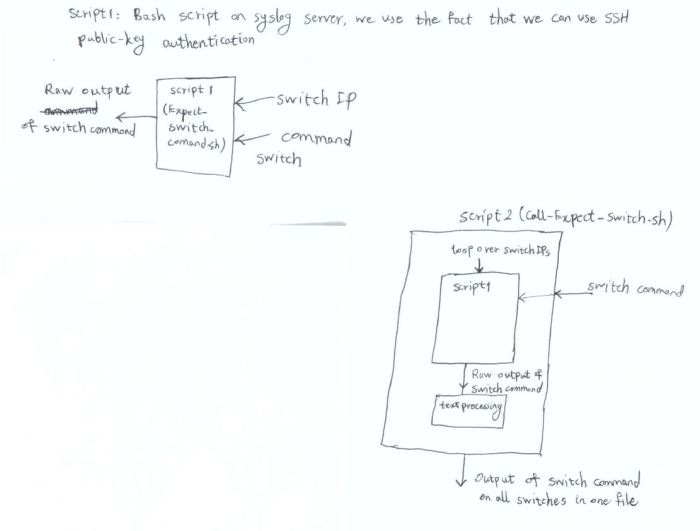
We use two scripts to accomplish this purpose:
1- A bash script containing “expect” script which takes IP and the command as input and runs the command on one switch (Expect_Switch_Command.sh)
2- Another bash script which calls the first script and uses a “for” loop to run the command on all switches (Call_Expect_Script.sh) and accepts the command as an argument.
We use the fact that the switches have been configured for public-key authentication from Syslog server.
# ./Call_Expect_Script_v3.sh “show vlan 2101”
The above, runs the command “show vlan 2101” on all HP switches
Call_Expect_Script_v3.sh
——————————————————————————————————————
#!/bin/bash
#
IP_08=x.x.x.x
IP_13=x.x.x.x
IP_14=x.x.x.x
IP_15=
IP_17=
IP_20=
IP_21=
IP_24=
IP_28=
IP_29=
IP_31=
IP_35=
IP_36=
IP_37=
IP_38=
IP_39=
IP_40=
# LIST1 is the list of switch numbers
LIST1=(08 13 14 15 17 20 21 24 28 29 31 35 36 37 38 39 40)
COMMAND=$1 # The command is passed as the first argument to the script
PATH1=/root/Expect_Switch_Command_v2.sh
PATH2=/tmp/Expect_Switch_Command_v2.out
PATH3=/root/Command_Output
PROMPT=#
EMAIL=admin@example.com
echo -e “\n The command is \”$COMMAND\”” > $PATH3
# Initialize the file that will store the command output for all switches
for i in “${LIST1[@]}”
# loop over switch IPs
do
ip=IP_”$i”
# calling the Expect_Switch_Command.sh script, the first argument is switch IP and the second one is the command that is run on switch.
$PATH1 ${!ip} “$COMMAND” > $PATH2
sleep 2
# We extract the switch name using the fact that propmpt name is the same as hostname
SWITCH_NAME=Switch”$i”
echo -e “\n\n====================$SWITCH_NAME===============================\n\n” >> $PATH3
# we find the line number for the first appearance of prompt sign “#” in Expect_Switch_Command.out
N=$(awk “/$PROMPT/{ print NR; exit }” $PATH2)
# M is the total line numbers in the file Expect_Switch_Command.out
M=$(wc -l < $PATH2)
P=$((M-N+1))
# We keep the line below Pth line in the file Expect_Switch_Command.out and add it to the end of the report file
tail -$P $PATH2 >> $PATH3
done
echo -e “\n====================END===============================\n” >> $PATH3
#Email the result as an attachment
SUBJ=””$COMMAND” Output”
echo “\”$COMMAND\” output on all HP switches” | mail -r “Syslog” -s “$SUBJ” -a $PATH3 $EMAIL
———————————————————————————————————————
Expect_Switch_Command_v2
—————————————————————————–
#!/bin/bash
SWITCH_IP=$1
COMMAND=$2
expect << EOD
#log_user 0
spawn ssh -p xxxx admin@$SWITCH_IP
expect -exact “Press any key to continue”
send “\r”
expect “*”
send “$COMMAND\r”
expect {
-ex “– MORE –” { send — ” “; exp_continue }
-re “.*# $” { send “exit\r” }
}
expect -re “>”
send “logout\r” s
end “y” EOD
 Peter's Tech Blog