
ARIN requires organizations to submit information for all IPv4 reassignments of /29 and larger and IPv6 reassignments of /64 or shorter prefix within seven days of the subdelegation
https://www.arin.net/resources/request/reassignments.html
Used to subdelegate IP addresses to a customer that does not need to:
- subdelegate the addresses to their own customers
- maintain their own in-addr.arpa delegation
- display their own point of contact (POC) information
It can also be used to change the customer name and address information (but not the range) on an existing simple reassignment and to remove simple reassignments. It is submitted by an ARIN Online user account linked to the parent organization’s Admin or Tech POC, or the Tech POC for the resource.
We need to create an API key to be used in the template that is sent by Email to ARIN.
To do so go to Web Account à API Key Management
Here are some excerpts from the URL IPv4 Reassign-Simple
———————————————————————
Template: ARIN-REASSIGN-SIMPLE-5.0
** As of March 2011
** Detailed instructions are located below the template.
- API Key: API-XXXX-XXXX-XXXX-XXXX
- Registration Action (N,M, or R):N(New), M(Modify), R(Remove)
- Network Name:
- IP Address and Prefix or Range: 10.0.0.0/24 or 10.0.0.0 – 10.0.0.255
- Origin AS:
- Private (Yes or No):
- Customer Name:
- Customer Address:
- Customer Address:
- Customer City:
- Customer State/Province:
- Customer Postal Code:
- Customer Country Code:
- Public Comments:
END OF TEMPLATE
If you would like assistance completing this template, please do
not hesitate to contact ARIN’s Registration Services Help Desk
at +1 (703) 227-0660. We’ll be glad to help you!
—————————–CUT HERE —————————
TEMPLATE INSTRUCTIONS: Please copy and paste the text-based template into the body of an e-mail and send to hostmaster@arin.net with the subject line, “REASSIGN SIMPLE”.
01. This template allows you to register a new simple reassignment, modify information for an existing simple reassignment or remove an existing simple reassignment. This registration action is required. Valid values are:
N for New
M for Modify
R for Remove
————————————————————————–
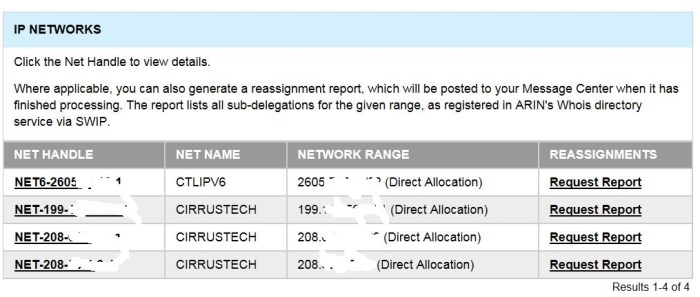
We can also check the existing reassignments by logging into ARIN account –> Manage & Request Resources –> Click on Org ID CTL-52 –> Click on “Request Report” in the “Reassignments” column
 Peter's Tech Blog